dyld 源码初探

前言

在开发过程中我们看到的程序入口都是 main 函数,所以认为程序都是从 main 函数开始执行的。其实在程序执行 main 函数之前已经执行了 +load 和 constructor 构造函数。今天我们就来看看在 main 函数执行之前都发生了什么。

什么是 dyld ?

程序运行依赖于很多动态库,动态库也是一个静态文件,格式和 iOS、MacOS、WatchOS 的可执行文件格式是一样的,都是 Mach-O 文件。他本身是不可以直接运行的,需要通过一个动态库加载器将其加载到内存空间,那么这个动态链接加载器就是 dyld 了。

dyld 源码分析

dyld 在手机中的路径是 /usr/lib/dyld,这是源码下载地址 dyld源码
代码从 dyldStartup.s 文件开始执行,下面我们看看用汇编实现的 __dyld_start 方法。

1
2
3
4
5
6
7
8
9
10
11
12
13
14
15
16
17
18
19
20
21
22
23
24
25
26
27
28
29
30
#if __arm64__

...省略代码...

// __ZN13dyldbootstrap5startEPK12macho_headeriPPKclS2_Pm 是被 name mangling 过的 c++ 函数(不明白什么是 name mangling 的可以谷歌一下 C++ 中的 name mangling)。
// 实际调用就是 dyldbootstrap::start(macho_header const*,int,char const**,long,macho_header const*,ulong *),此函数的调用会完成动态库加载的一系列过程,并返回主程序 main 函数的地址,保存在 x0 寄存器。
bl __ZN13dyldbootstrap5startEPK12macho_headeriPPKclS2_Pm
// 将主程序 main 函数的地址存入 x16 寄存器
mov x16,x0
ldr x1, [sp]
cmp x1, #0
// 调用 b.ne Lnew 进行准备入参,环境变量等
b.ne Lnew

// LC_UNIXTHREAD way, clean up stack and jump to result
add sp, x28, #8 // restore unaligned stack pointer without app mh
// 跳转主程序 main 函数,也就是我们 App 中的 mian 函数被调用
br x16

// LC_MAIN case, set up stack for call to main()
Lnew: mov lr, x1 // simulate return address into _start in libdyld.dylib
ldr x0, [x28, #8] // main param1 = argc
add x1, x28, #16 // main param2 = argv
add x2, x1, x0, lsl #3
add x2, x2, #8 // main param3 = &env[0]
mov x3, x2

...省略代码...

#endif // __arm64__

我们看到在 __dyld_start 中调用了 dyldbootstrap::start 。下面我们就看看 dyldbootstrap::start 做了什么:

1
2
3
4
5
6
7
8
9
10
11
12
13
14
15
16
17
18
19
20
21
22
23
24
25
26
27
28
29
30
31
32
33
34
35
36
37
38
uintptr_t start(const struct macho_header* appsMachHeader, int argc, const char* argv[], 
intptr_t slide, const struct macho_header* dyldsMachHeader,
uintptr_t* startGlue)
{
// if kernel had to slide dyld, we need to fix up load sensitive locations
// we have to do this before using any global variables
// 通过 kernel 传过来的 slieds 修正 dyld 的 non-lazy 符号地址,因为 dyld 有了 ASLR ,所以符号也都需要根据 ASLR 做偏移,lazy 的符号因为其动态库已经做了改作的偏移不需要处理。
if ( slide != 0 ) {
rebaseDyld(dyldsMachHeader, slide);
}

// allow dyld to use mach messaging
// 消息初始化
mach_init();

// kernel sets up env pointer to be just past end of agv array
const char** envp = &argv[argc+1];

// kernel sets up apple pointer to be just past end of envp array
const char** apple = envp;
while(*apple != NULL) { ++apple; }
++apple;

// set up random value for stack canary
// 栈溢出保护
__guard_setup(apple);

#if DYLD_INITIALIZER_SUPPORT
// run all C++ initializers inside dyld
runDyldInitializers(dyldsMachHeader, slide, argc, argv, envp, apple);
#endif

// now that we are done bootstrapping dyld, call dyld's main
uintptr_t appsSlide = slideOfMainExecutable(appsMachHeader);

// 此函数的调用会完成动态库加载的一系列过程,并返回主程序 main 函数入口,也就是 App 中的 main 函数地址
return dyld::_main(appsMachHeader, appsSlide, argc, argv, envp, apple, startGlue);
}

上面看到了调用 dyld::_main 函数,其实在该函数中便完成了整个动态库加载的一系列过程,接下来我们仔细看看中间都做了什么:

1
2
3
4
5
6
7
8
9
10
11
12
13
14
15
16
17
18
19
20
21
22
23
24
25
26
27
28
29
30
31
32
33
34
35
36
37
38
39
40
41
42
43
44
45
46
47
48
49
50
51
52
53
54
55
56
57
58
59
60
61
62
63
64
65
66
67
68
69
70
71
72
73
74
75
76
77
78
79
80
81
82
83
84
85
86
87
88
89
90
91
92
93
94
95
96
97
98
99
100
101
102
103
104
105
106
107
108
109
110
111
112
113
114
115
116
117
118
119
120
121
122
123
124
125
126
127
128
129
130
131
132
133
134
135
136
137
138
139
140
141
142
143
144
145
146
147
148
149
150
151
152
153
154
155
156
157
158
159
160
161
162
163
164
165
166
167
168
169
170
171
172
173
174
175
176
177
178
179
180
181
182
183
184
185
186
187
188
189
190
191
192
193
194
195
196
197
198
199
200
201
202
203
204
205
206
207
208
209
210
211
212
213
214
215
216
217
218
219
220
221
222
223
224
225
226
227
228
229
230
231
232
233
234
235
236
237
238
239
240
241
242
243
244
245
246
247
248
249
250
251
252
253
254
255
256
257
258
259
260
261
262
263
264
265
266
267
268
269
270
271
272
273
274
275
276
277
278
279
280
281
282
283
284
285
286
287
288
289
290
291
292
293
294
295
296
297
298
299
300
301
302
303
304
305
306
307
308
309
310
311
312
313
314
315
316
317
318
319
320
321
322
323
324
325
326
327
328
329
330
331
332
333
334
335
336
337
338
339
340
341
342
343
344
345
346
347
348
349
350
351
352
353
354
355
356
357
358
359
360
361
362
363
364
365
366
367
368
369
370
371
372
373
374
uintptr_t
_main(const macho_header* mainExecutableMH, uintptr_t mainExecutableSlide,
int argc, const char* argv[], const char* envp[], const char* apple[],
uintptr_t* startGlue)
{
uintptr_t result = 0;
// 保存执行文件头部,后续可以根据头部访问其他信息
sMainExecutableMachHeader = mainExecutableMH;
#if __MAC_OS_X_VERSION_MIN_REQUIRED
// if this is host dyld, check to see if iOS simulator is being run
const char* rootPath = _simple_getenv(envp, "DYLD_ROOT_PATH");
if ( rootPath != NULL ) {
// Add dyld to the kernel image info before we jump to the sim
notifyKernelAboutDyld();

// look to see if simulator has its own dyld
char simDyldPath[PATH_MAX];
strlcpy(simDyldPath, rootPath, PATH_MAX);
strlcat(simDyldPath, "/usr/lib/dyld_sim", PATH_MAX);
int fd = my_open(simDyldPath, O_RDONLY, 0);
if ( fd != -1 ) {
const char* errMessage = useSimulatorDyld(fd, mainExecutableMH, simDyldPath, argc, argv, envp, apple, startGlue, &result);
if ( errMessage != NULL )
halt(errMessage);
return result;
}
}
#endif

CRSetCrashLogMessage("dyld: launch started");

// 设置上下文信息
setContext(mainExecutableMH, argc, argv, envp, apple);

// Pickup the pointer to the exec path.
// 获取可执行文件路径
sExecPath = _simple_getenv(apple, "executable_path");

// <rdar://problem/13868260> Remove interim apple[0] transition code from dyld
if (!sExecPath) sExecPath = apple[0];
// 将相对路径转成绝对路径
if ( sExecPath[0] != '/' ) {
// have relative path, use cwd to make absolute
char cwdbuff[MAXPATHLEN];
if ( getcwd(cwdbuff, MAXPATHLEN) != NULL ) {
// maybe use static buffer to avoid calling malloc so early...
char* s = new char[strlen(cwdbuff) + strlen(sExecPath) + 2];
strcpy(s, cwdbuff);
strcat(s, "/");
strcat(s, sExecPath);
sExecPath = s;
}
}
// Remember short name of process for later logging
// 获取文件的名字
sExecShortName = ::strrchr(sExecPath, '/');
if ( sExecShortName != NULL )
++sExecShortName;
else
sExecShortName = sExecPath;
// 配置进程是否受限
configureProcessRestrictions(mainExecutableMH);

#if __MAC_OS_X_VERSION_MIN_REQUIRED
if ( gLinkContext.processIsRestricted ) {
pruneEnvironmentVariables(envp, &apple);
// set again because envp and apple may have changed or moved
setContext(mainExecutableMH, argc, argv, envp, apple);
}
else
#endif
{
// 检查设置环境变量
checkEnvironmentVariables(envp);
// 如果 DYLD_FALLBACK 为 nil,将其设置为默认值
defaultUninitializedFallbackPaths(envp);
}

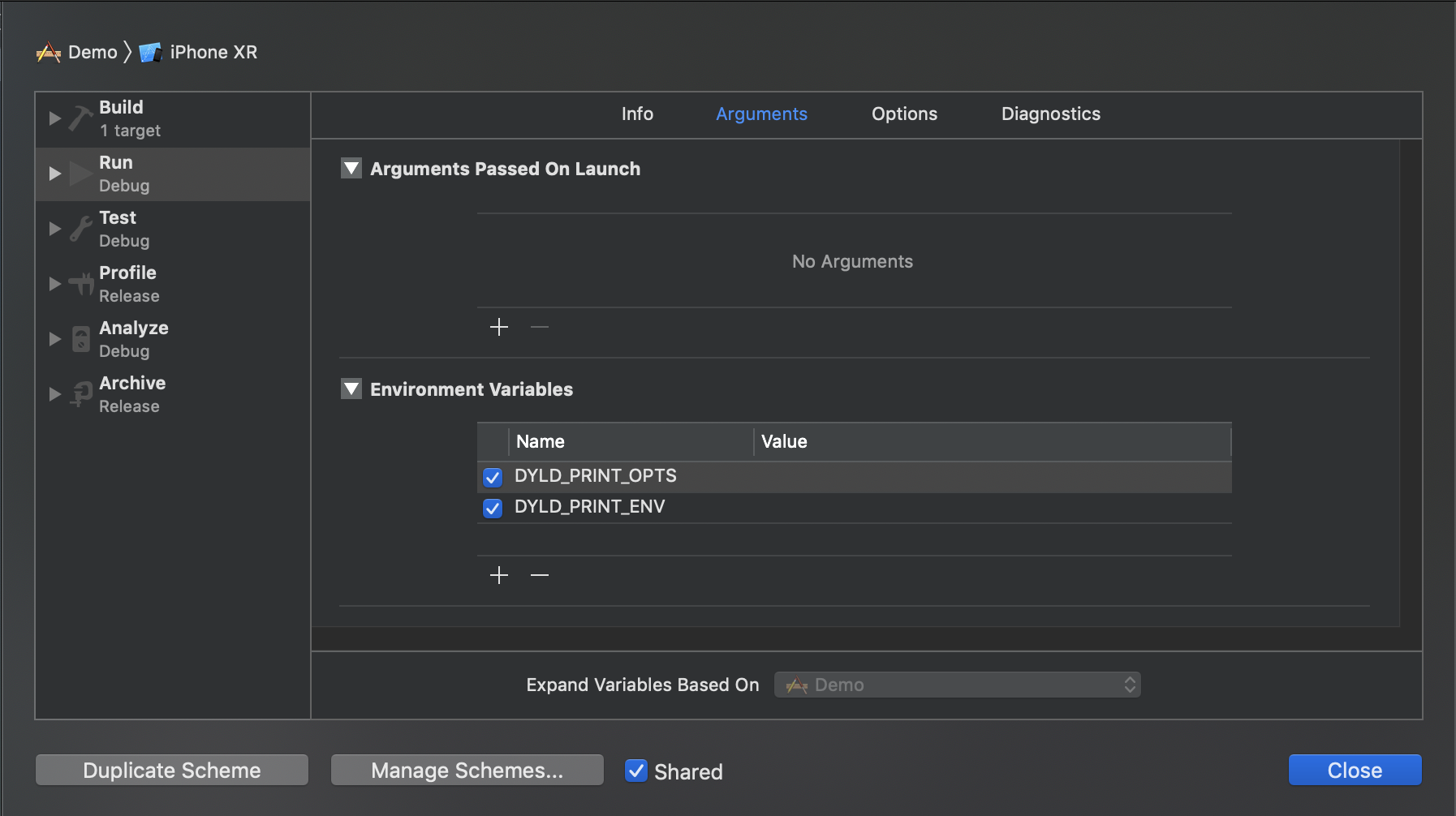
// 处理环境变量,如果我们在 xcode 中的 Edit Scheme -> run -> Argument 中添加了 DYLD_PRINT_OPTS、DYLD_PRINT_ENV 等参数,可在输出打印相关信息
if ( sEnv.DYLD_PRINT_OPTS )
printOptions(argv);
if ( sEnv.DYLD_PRINT_ENV )
printEnvironmentVariables(envp);

// 获取当前运行架构的信息
getHostInfo(mainExecutableMH, mainExecutableSlide);
// install gdb notifier
stateToHandlers(dyld_image_state_dependents_mapped, sBatchHandlers)->push_back(notifyGDB);
stateToHandlers(dyld_image_state_mapped, sSingleHandlers)->push_back(updateAllImages);
// make initial allocations large enough that it is unlikely to need to be re-alloced
sImageRoots.reserve(16);
sAddImageCallbacks.reserve(4);
sRemoveImageCallbacks.reserve(4);
sImageFilesNeedingTermination.reserve(16);
sImageFilesNeedingDOFUnregistration.reserve(8);

#if !TARGET_IPHONE_SIMULATOR
#ifdef WAIT_FOR_SYSTEM_ORDER_HANDSHAKE
// <rdar://problem/6849505> Add gating mechanism to dyld support system order file generation process
WAIT_FOR_SYSTEM_ORDER_HANDSHAKE(dyld::gProcessInfo->systemOrderFlag);
#endif
#endif


try {
// add dyld itself to UUID list
addDyldImageToUUIDList();
notifyKernelAboutDyld();

#if SUPPORT_ACCELERATE_TABLES
bool mainExcutableAlreadyRebased = false;

reloadAllImages:
#endif

CRSetCrashLogMessage(sLoadingCrashMessage);
// instantiate ImageLoader for main executable
// 作为主程序初始化 imageLoader,用于后续的链接等过程,主程序作为 dyld 的第一个被 addimage 的镜像,所以我们总是能够通过 _dyld_get_image_header(0) 或者 _dyld_get_image_name(0) 等,索引到第一个 image 镜像作为主程序的相关信息。
// 加载可执行文件,并生成一个 ImageLoader 实例对象
sMainExecutable = instantiateFromLoadedImage(mainExecutableMH, mainExecutableSlide, sExecPath);
gLinkContext.mainExecutable = sMainExecutable;
gLinkContext.mainExecutableCodeSigned = hasCodeSignatureLoadCommand(mainExecutableMH);

#if TARGET_IPHONE_SIMULATOR
// check main executable is not too new for this OS
{
if ( ! isSimulatorBinary((uint8_t*)mainExecutableMH, sExecPath) ) {
throwf("program was built for a platform that is not supported by this runtime");
}
uint32_t mainMinOS = sMainExecutable->minOSVersion();

// dyld is always built for the current OS, so we can get the current OS version
// from the load command in dyld itself.
uint32_t dyldMinOS = ImageLoaderMachO::minOSVersion((const mach_header*)&__dso_handle);
if ( mainMinOS > dyldMinOS ) {
#if TARGET_OS_WATCH
throwf("app was built for watchOS %d.%d which is newer than this simulator %d.%d",
mainMinOS >> 16, ((mainMinOS >> 8) & 0xFF),
dyldMinOS >> 16, ((dyldMinOS >> 8) & 0xFF));
#elif TARGET_OS_TV
throwf("app was built for tvOS %d.%d which is newer than this simulator %d.%d",
mainMinOS >> 16, ((mainMinOS >> 8) & 0xFF),
dyldMinOS >> 16, ((dyldMinOS >> 8) & 0xFF));
#else
throwf("app was built for iOS %d.%d which is newer than this simulator %d.%d",
mainMinOS >> 16, ((mainMinOS >> 8) & 0xFF),
dyldMinOS >> 16, ((dyldMinOS >> 8) & 0xFF));
#endif
}
}
#endif


#if __MAC_OS_X_VERSION_MIN_REQUIRED
// <rdar://problem/22805519> be less strict about old mach-o binaries
uint32_t mainSDK = sMainExecutable->sdkVersion();
gLinkContext.strictMachORequired = (mainSDK >= DYLD_MACOSX_VERSION_10_12) || gLinkContext.processUsingLibraryValidation;
#else
// simulators, iOS, tvOS, and watchOS are always strict
gLinkContext.strictMachORequired = true;
#endif

// load shared cache
// 检查共享缓存是否开启,在 iOS 中必须开启
checkSharedRegionDisable();
#if DYLD_SHARED_CACHE_SUPPORT
if ( gLinkContext.sharedRegionMode != ImageLoader::kDontUseSharedRegion ) {
// 检查共享缓存是否映射到了共享区域
mapSharedCache();
} else {
dyld_kernel_image_info_t kernelCacheInfo;
bzero(&kernelCacheInfo.uuid[0], sizeof(uuid_t));
kernelCacheInfo.load_addr = 0;
kernelCacheInfo.fsobjid.fid_objno = 0;
kernelCacheInfo.fsobjid.fid_generation = 0;
kernelCacheInfo.fsid.val[0] = 0;
task_register_dyld_shared_cache_image_info(mach_task_self(), kernelCacheInfo, true, false);
}
#endif

#if SUPPORT_ACCELERATE_TABLES
sAllImages.reserve((sAllCacheImagesProxy != NULL) ? 16 : INITIAL_IMAGE_COUNT);
#else
sAllImages.reserve(INITIAL_IMAGE_COUNT);
#endif

// Now that shared cache is loaded, setup an versioned dylib overrides
#if SUPPORT_VERSIONED_PATHS
// 检查库的版本是否有更新,如果有则覆盖原有的
checkVersionedPaths();
#endif


// dyld_all_image_infos image list does not contain dyld
// add it as dyldPath field in dyld_all_image_infos
// for simulator, dyld_sim is in image list, need host dyld added
#if TARGET_IPHONE_SIMULATOR
// get path of host dyld from table of syscall vectors in host dyld
void* addressInDyld = gSyscallHelpers;
#else
// get path of dyld itself
void* addressInDyld = (void*)&__dso_handle;
#endif
char dyldPathBuffer[MAXPATHLEN+1];
int len = proc_regionfilename(getpid(), (uint64_t)(long)addressInDyld, dyldPathBuffer, MAXPATHLEN);
if ( len > 0 ) {
dyldPathBuffer[len] = '\0'; // proc_regionfilename() does not zero terminate returned string
if ( strcmp(dyldPathBuffer, gProcessInfo->dyldPath) != 0 )
gProcessInfo->dyldPath = strdup(dyldPathBuffer);
}

// load any inserted libraries
// 加载所有 DYLD_INSERT_LIBRARIES 指定的库
if ( sEnv.DYLD_INSERT_LIBRARIES != NULL ) {
for (const char* const* lib = sEnv.DYLD_INSERT_LIBRARIES; *lib != NULL; ++lib)
// 这也是很多越狱情况下 CydiaSubstrate 不需要修改 binary 就能运行加载动态库的原因,越狱情况下可以直接修改 App 的环境变量,从而注入动态库
loadInsertedDylib(*lib);
}
// record count of inserted libraries so that a flat search will look at
// inserted libraries, then main, then others.
sInsertedDylibCount = sAllImages.size()-1;

// link main executable
gLinkContext.linkingMainExecutable = true;
#if SUPPORT_ACCELERATE_TABLES
if ( mainExcutableAlreadyRebased ) {
// previous link() on main executable has already adjusted its internal pointers for ASLR
// work around that by rebasing by inverse amount
sMainExecutable->rebase(gLinkContext, -mainExecutableSlide);
}
#endif
// 链接主程序
link(sMainExecutable, sEnv.DYLD_BIND_AT_LAUNCH, true, ImageLoader::RPathChain(NULL, NULL), -1);
sMainExecutable->setNeverUnloadRecursive();
if ( sMainExecutable->forceFlat() ) {
gLinkContext.bindFlat = true;
gLinkContext.prebindUsage = ImageLoader::kUseNoPrebinding;
}

// link any inserted libraries
// 链接插入的动态库
// do this after linking main executable so that any dylibs pulled in by inserted
// dylibs (e.g. libSystem) will not be in front of dylibs the program uses
if ( sInsertedDylibCount > 0 ) {
for(unsigned int i=0; i < sInsertedDylibCount; ++i) {
ImageLoader* image = sAllImages[i+1];
// 循环链接动态库
link(image, sEnv.DYLD_BIND_AT_LAUNCH, true, ImageLoader::RPathChain(NULL, NULL), -1);
image->setNeverUnloadRecursive();
}
// only INSERTED libraries can interpose
// register interposing info after all inserted libraries are bound so chaining works
for(unsigned int i=0; i < sInsertedDylibCount; ++i) {
ImageLoader* image = sAllImages[i+1];
// 注册符号插入
image->registerInterposing();
}
}

// <rdar://problem/19315404> dyld should support interposition even without DYLD_INSERT_LIBRARIES
for (long i=sInsertedDylibCount+1; i < sAllImages.size(); ++i) {
ImageLoader* image = sAllImages[i];
if ( image->inSharedCache() )
continue;
// 注册符号插入
image->registerInterposing();
}
#if SUPPORT_ACCELERATE_TABLES
if ( (sAllCacheImagesProxy != NULL) && ImageLoader::haveInterposingTuples() ) {
// Accelerator tables cannot be used with implicit interposing, so relaunch with accelerator tables disabled
ImageLoader::clearInterposingTuples();
// unmap all loaded dylibs (but not main executable)
for (long i=1; i < sAllImages.size(); ++i) {
ImageLoader* image = sAllImages[i];
if ( image == sMainExecutable )
continue;
if ( image == sAllCacheImagesProxy )
continue;
image->setCanUnload();
ImageLoader::deleteImage(image);
}
// note: we don't need to worry about inserted images because if DYLD_INSERT_LIBRARIES was set we would not be using the accelerator table
sAllImages.clear();
sImageRoots.clear();
sImageFilesNeedingTermination.clear();
sImageFilesNeedingDOFUnregistration.clear();
sAddImageCallbacks.clear();
sRemoveImageCallbacks.clear();
sDisableAcceleratorTables = true;
sAllCacheImagesProxy = NULL;
sMappedRangesStart = NULL;
mainExcutableAlreadyRebased = true;
gLinkContext.linkingMainExecutable = false;
resetAllImages();
goto reloadAllImages;
}
#endif

// apply interposing to initial set of images
for(int i=0; i < sImageRoots.size(); ++i) {
// 应用符号插入
sImageRoots[i]->applyInterposing(gLinkContext);
}
gLinkContext.linkingMainExecutable = false;

// <rdar://problem/12186933> do weak binding only after all inserted images linked
// 弱符号绑定
sMainExecutable->weakBind(gLinkContext);

#if DYLD_SHARED_CACHE_SUPPORT
// If cache has branch island dylibs, tell debugger about them
if ( (sSharedCache != NULL) && (sSharedCache->mappingOffset >= 0x78) && (sSharedCache->branchPoolsOffset != 0) ) {
uint32_t count = sSharedCache->branchPoolsCount;
dyld_image_info info[count];
const uint64_t* poolAddress = (uint64_t*)((char*)sSharedCache + sSharedCache->branchPoolsOffset);
// <rdar://problem/20799203> empty branch pools can be in development cache
if ( ((mach_header*)poolAddress)->magic == sMainExecutableMachHeader->magic ) {
for (int poolIndex=0; poolIndex < count; ++poolIndex) {
uint64_t poolAddr = poolAddress[poolIndex] + sSharedCacheSlide;
info[poolIndex].imageLoadAddress = (mach_header*)(long)poolAddr;
info[poolIndex].imageFilePath = "dyld_shared_cache_branch_islands";
info[poolIndex].imageFileModDate = 0;
}
// add to all_images list
addImagesToAllImages(count, info);
// tell gdb about new branch island images
gProcessInfo->notification(dyld_image_adding, count, info);
}
}
#endif

CRSetCrashLogMessage("dyld: launch, running initializers");
#if SUPPORT_OLD_CRT_INITIALIZATION
// Old way is to run initializers via a callback from crt1.o
if ( ! gRunInitializersOldWay )
initializeMainExecutable();
#else
// run all initializers
// 初始化主程序,在这里可以参考 runtime 的源码,runtime 里面注册了 dyld 的回调通知,会调用 load_images,然后去调用各个类的 +load 方法等,这也是为何 +load 会在主程序 main 函数执行之前执行的根本原因
initializeMainExecutable();
#endif

// notify any montoring proccesses that this process is about to enter main()
notifyMonitoringDyldMain();

// find entry point for main executable
// 寻找主程序 main 函数,并作为结果返回,然后上述的汇编文件中会通过 br x16 来进行主程序 main 函数调用
result = (uintptr_t)sMainExecutable->getThreadPC();
if ( result != 0 ) {
// main executable uses LC_MAIN, needs to return to glue in libdyld.dylib
if ( (gLibSystemHelpers != NULL) && (gLibSystemHelpers->version >= 9) )
*startGlue = (uintptr_t)gLibSystemHelpers->startGlueToCallExit;
else
halt("libdyld.dylib support not present for LC_MAIN");
}
else {
// main executable uses LC_UNIXTHREAD, dyld needs to let "start" in program set up for main()
result = (uintptr_t)sMainExecutable->getMain();
*startGlue = 0;
}
}
catch(const char* message) {
syncAllImages();
halt(message);
}
catch(...) {
dyld::log("dyld: launch failed\n");
}

CRSetCrashLogMessage(NULL);

return result;
}

dyld::_main 函数的最后,找到主程序 main 函数的地址,此时 dyld 加载动态库的流程就结束了,进入到了我们熟悉的 main 函数。

简单流程

整个动态库加载的流程主要包括以下个步骤:

1.设置上下文信息,配置进程是否受限

首先调用 setContext 设置上下文信息,然后调用 configureProcessRestrictions 设置进程是否受限。只要设置了 uidgid 就会变成受限模式。受限模式其实就是忽略 DYLD 环境变量。

值得一提的是在 iOS10.3.2 及以上版本中,设置 Other Linker Flags-Wl,-sectcreate,__RESTRICT,__restrict,/dev/null 也不能阻止 DYLD_INSERT_LIBRARIES 的注入。

2.配置环境变量,获取当前运行架构

调用 checkEnvironmentVariables 根本环境变量设置相应的值,但是如果 sEnvModeenvNone (受限模式),就直接跳过,否则调用 processDyldEnvironmentVariable 处理并设置环境变量。

调用 getHostInfo 获取当前运行的架构信息。

在开发中,我们可以点击 Edit Scheme 在环境变量添加 DYDLD_PRINT_OPTSDYLD_PRINT_ENV ,就能打印当前参数和环境变量。

1
2
3
4
5
6
// 如果设置 DYDLD_PRINT_OPTS 环境变量,则打印
if ( sEnv.DYLD_PRINT_OPTS )
printOptions(argv);
// 如果设置 DYDLD_PRINT_ENV 环境变量,则打印
if ( sEnv.DYLD_PRINT_ENV )
printEnvironmentVariables(envp);

Xcode设置环境变量

3.加载可执行文件,生成一个 ImageLoader 实例对象

调用 instantiateFromLoadedImage 函数来实例化一个 ImageLoader 对象。

作为主程序初始化的 imageLoader 用于后续的链接等过程,主程序作为 dyld 的第一个被 addimage 的镜像,所以我们总是能够通过_dyld_get_image_header(0) 或者 _dyld_get_image_name(0) 等,索引到第一个 image 镜像为主程序的相关信息。

4.检查共享缓存是否映射到了共享区域
5.加载所有插入的库

遍历 DYLD_INSERT_LIBRARIES 环境变量,然后调用 loadInsertDylib 加载。

6.链接主程序

调用 link 链接主程序。

7.链接所有插入的库,执行符号替换

sAllImage(除第一项主程序)中的库调用 Link 函数进行链接,然后调用 register Interposing 注册符号替换。

8.执行初始化方法

initializeMainExecutable() 执行初始化方法,+loadconstructor 构造方法就是在这里执行的。

9.寻找主程序入口

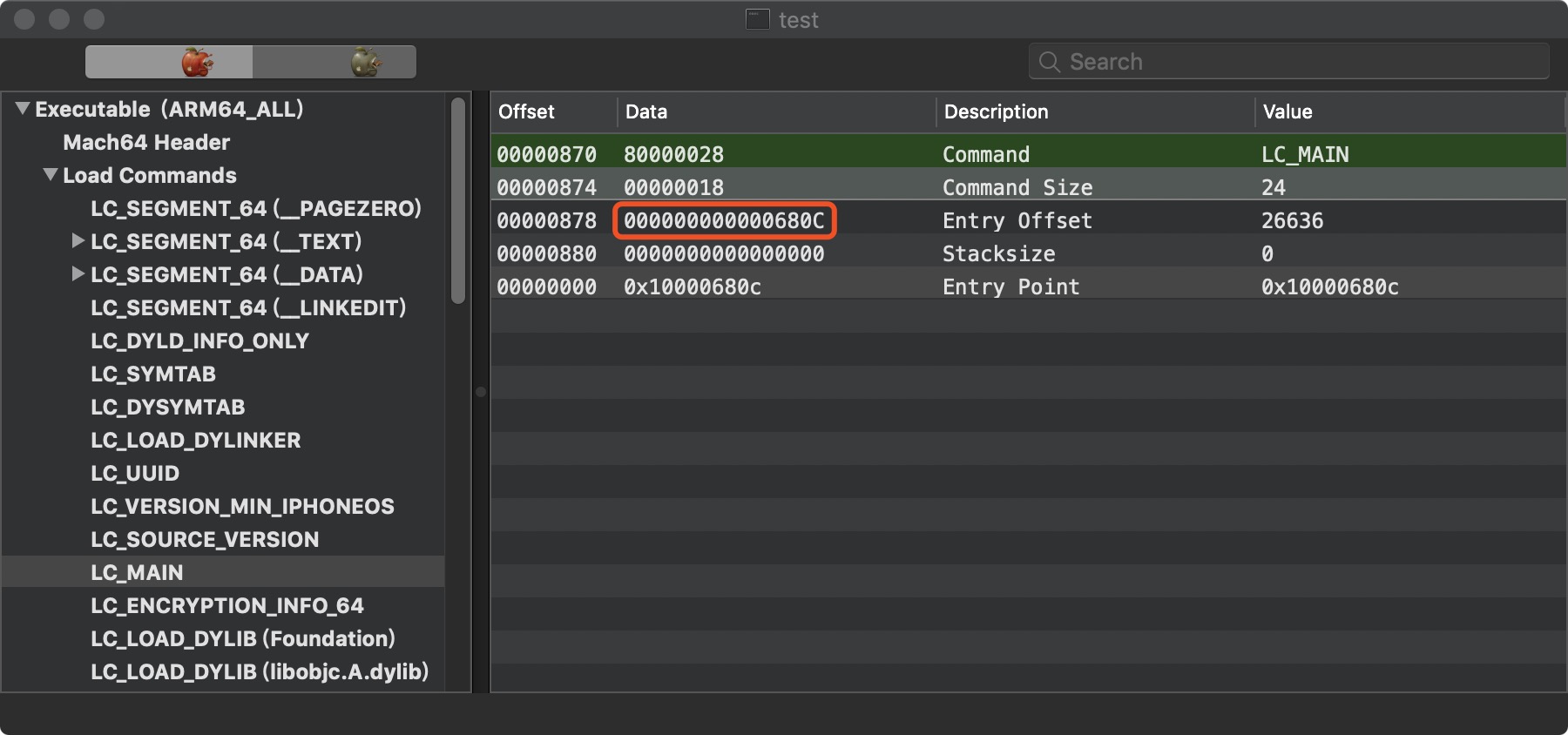
调用 getThreadPC() 读取 LC_MAIN 入口,如果找不到就读取 LC_UNIXTHREAD ,然后跳转到程序入口处执行,这样就来到了 main 函数。
LC_MAIN

Load Commands

_main

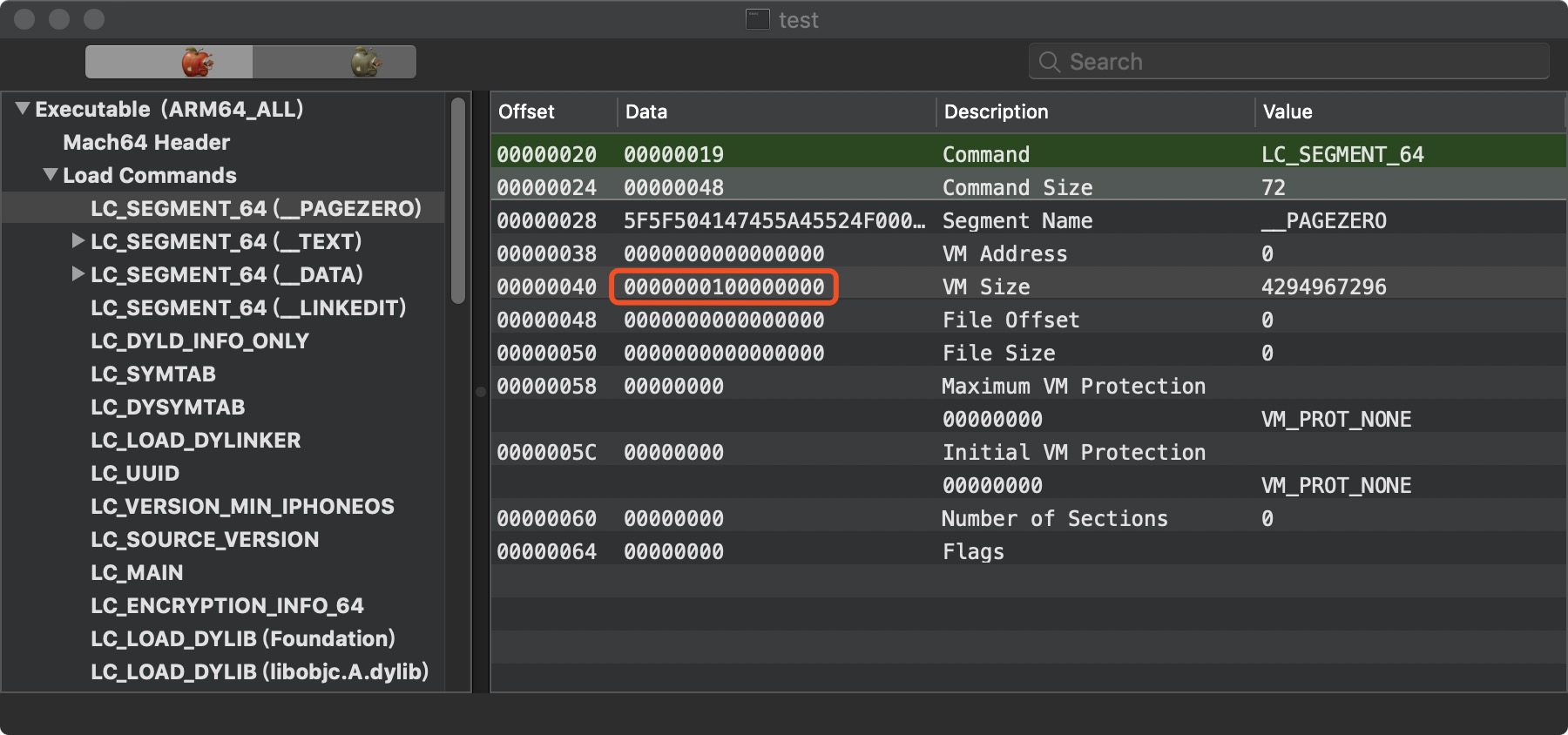
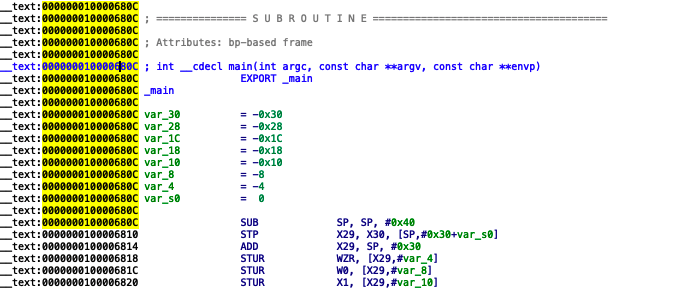
LC_MAIN 加上 Load CommandsVM Size 就是我们程序 mian 函数的地址。

写在后面

我们现在搞清楚了 dyld 是如何加载的,以及从 __dyld_startmina 之间都做了什么,那么 dyld 又是被谁调用的呢?下次让我们继续分析。